
Last updated: June 2026 • By Allison Wilson
Nobody opens their Snowflake bill hoping to find surprises. But for a lot of SMBs, that’s exactly what
happens — usage looks flat, the team hasn’t changed much, and yet the monthly number keeps
creeping up. In our cost reviews, the gap between what a team expects to pay and what they actually
pay is rarely small.
The reassuring part: most of that overspend comes from a handful of repeatable, fixable patterns —
not from using Snowflake “too much.” This guide walks through the seven most common ways SMBs
waste money on Snowflake, and the Snowflake cost optimization moves that bring the bill back
down without slowing anyone’s queries.
TL;DR: Snowflake bills balloon for predictable reasons — idle warehouses, oversized warehouses,
over-frequent dashboard refreshes, no auto-suspend, no resource monitors, messy queries, and
storage nobody cleans up. Fix those seven; right-sizing plus tighter auto-suspend alone have
produced documented bill reductions of 30–50%.
Why Snowflake Bills Surprise SMBs
Snowflake’s pricing is elastic, which is exactly why it’s powerful — and exactly why it’s hard to predict.
Per Snowflake’s own documentation, you pay for compute by the second with a 60-second minimum
each time a warehouse starts, and each step up in warehouse size roughly doubles the credits
consumed per hour — an X-Small burns 1 credit/hour, a Medium 4, a Large 8, and so on. Virtual
warehouse compute typically accounts for around 80% of a customer’s bill, which is why it’s where
nearly all the savings live.
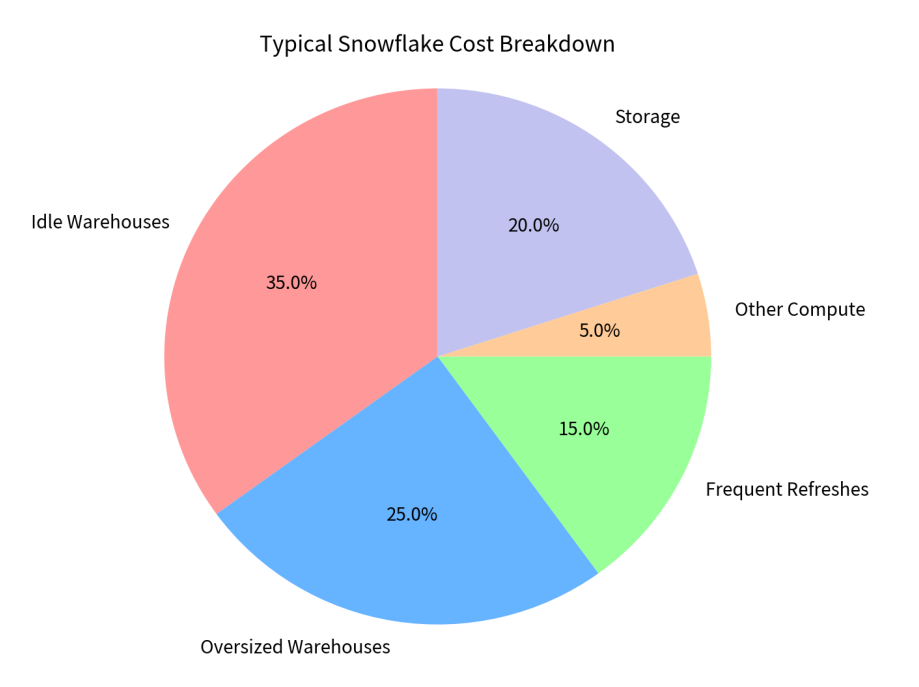
That elasticity means a few small misconfigurations don’t show up as one big line item. They leak
quietly, all month, across every workload — usage feels normal while the number climbs. Here’s where
that leak almost always comes from
Typical Snowflake Cost Breakdown
The 7 Ways SMBs Overspend on Snowflake
- Idle warehouses left running
An idle warehouse is, in the plainest terms, burning money — it’s provisioned and billable even when
no query is running. Teams spin up a warehouse for a task, get pulled away, and leave it on “just in
case.” Across a month, that idle time is one of the single biggest sources of waste.
Fix: Set aggressive auto-suspend and review which warehouses run when nobody’s using them. - Oversized warehouses for small jobs
A frequent pattern: teams default every workload to a Medium or Large warehouse — even small,
interactive queries. Because each size step roughly doubles credit consumption, an oversized
warehouse can cost 4–8x what the job actually needs, with no matching speed benefit.
Fix: Match warehouse size to workload. Small interactive queries belong on XS/S; reserve big warehouses
for genuinely heavy jobs. - Dashboards that refresh more often than the data changes
This one is invisible until you look for it. A dashboard set to refresh every minute against a table that
only updates hourly runs the same query 59 times an hour for no new information — pure wasted
credits.
Fix: Align refresh schedules to the actual update cadence of the source data. - No auto-suspend (or it’s set too loose)
Without auto-suspend, a warehouse keeps billing long after the last query finishes. With it set
correctly, the warehouse pauses itself the moment work stops.
Fix: Turn on auto-suspend and tune it tight — but not so aggressive that constant restarts add their own
startup costs. Balance it to your query rhythm. - No resource monitors / spending guardrails
Resource monitors are the circuit breaker for your Snowflake bill. Without them, a single runaway
query or forgotten job can burn through a quarter’s budget over a weekend — and you won’t know until
the invoice lands.
Fix: Set resource monitors with alert thresholds; use tighter limits on dev than on production. - Inefficient queries that spill and re-scan
Poorly written queries spill to disk, queue excessively, or re-scan data they don’t need — quietly
consuming extra credits with no added value. Snowflake also caches query results for 24 hours, and
teams that don’t lean on that caching pay to re-run identical work all day.
Fix: Review your heaviest, most frequent queries first; small rewrites on the top offenders deliver the biggest
savings. - Storage and data nobody cleans up
Compute is where most of the bill lives, but storage creep — abandoned tables, oversized Time Travel
retention, duplicate datasets — adds a steady tax. Longer Time Travel (up to 90 days on Enterprise) is
useful, but only if you actually need it.
Fix: Audit retention settings and retire datasets nobody queries. Match Time Travel to real recovery needs, not the maximum.
Warehouse Size Cost Impact
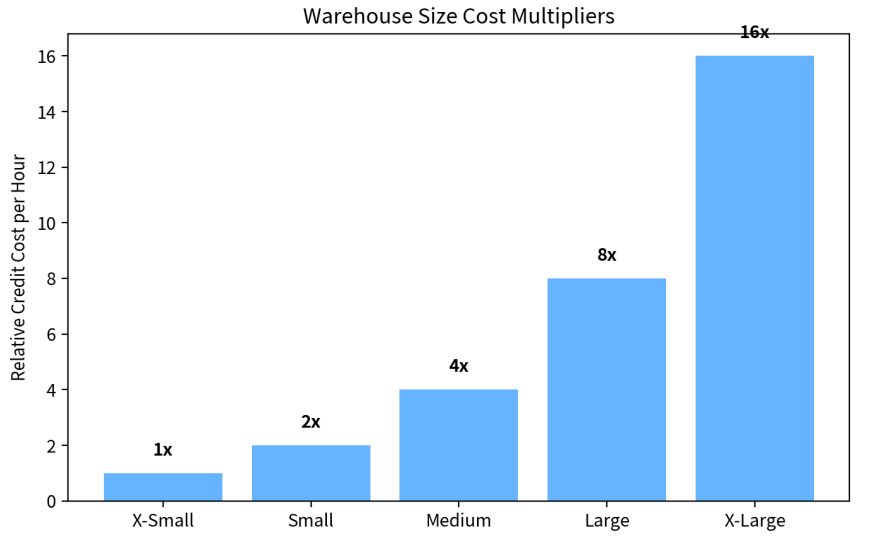
Right-sizing + tighter auto-suspend can cut bills by 30–50%. For a K/month spend, that’s 00–,500 monthly savings — 1K–8K yearly.
Frequently Asked Questions
What is Snowflake cost optimization?
It’s the practice of analyzing usage and configuration to reduce spend — mainly on compute credits —
without sacrificing query performance
Why is my Snowflake bill so high?
Usually idle warehouses left running, oversized warehouses for small jobs, dashboards refreshing
more often than the data changes, and missing auto-suspend or resource monitors. Each leaks credits
quietly across the month.
Does optimization slow queries?
No — done correctly it usually improves performance. The goal is to stop paying for idle and
redundant compute, not to throttle real workloads
The Bottom Line
Your Snowflake bill probably isn’t high because you’re using it too much. It’s high because of idle
compute, oversized warehouses, over-eager refreshes, and missing guardrails — seven fixable
patterns. Good Snowflake cost optimization is mostly configuration and discipline, and it pays back
every single month.
Tune the foundation now, and Snowflake stays an asset instead of a surprise
What would a 30% lower Snowflake bill mean this year?
For most SMBs that’s real money — and the leaks causing it are invisible until someone reads
the usage data. CDO Advisors runs Snowflake cost reviews built around one deliverable: a
short list of the specific warehouses, queries, and settings draining your budget, ranked by
what each is costing you. One expert, transparent $150/hr, no retainers, no junior consultants
learning on your bill.
You’ll walk away knowing your three biggest leaks and what each one is worth fixing.
